The Script Lookbook: A Stylish Google Slides Template
You've got a presentation to make, and the default templates in Google Slides feel… underwhelming. They're either too corporate, too generic, or just don't capture the creative energy of your project. That's where a dedicated design asset like The Script Lookbook - Google Slides comes into play. It's not just a set of slides; it's a visual framework designed to communicate elegance, professionalism, and a distinct creative sensibility right from the first click.
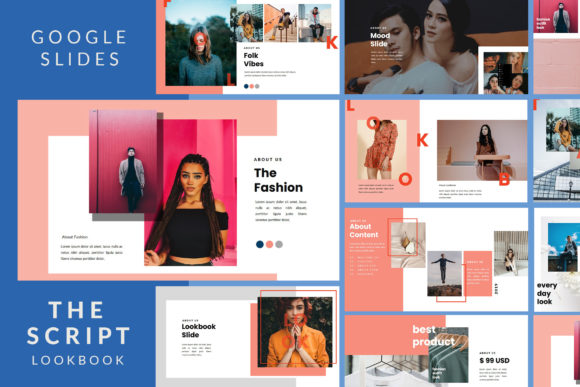
This presentation template is built on a foundation of clean, modern typography and a carefully curated aesthetic. Think of it as a lookbook—a visual collection that tells a story. The design leans into a sophisticated, slightly editorial style, using ample white space, strategic color accents, and a balanced layout to make your content the star. It avoids flashy distractions, instead opting for a timeless elegance that feels both professional and beautiful. The overall personality is one of quiet confidence: it's stylish without being trendy, and detailed without being cluttered.
Where This Presentation Template Truly Shines
The versatility of The Script Lookbook is one of its strongest suits. Its design is intentionally adaptable, making it a practical choice for a wide range of real-world applications. If you're a photographer compiling a portfolio, a designer pitching a new brand identity, or a marketer outlining a social media strategy, this template provides the right canvas. It works exceptionally well for:
- Creative Portfolios: For illustrators, artists, and portfolio designers, the layout supports high-impact visuals with minimal text, letting the work speak for itself.
- Official Presentations: The clean structure and professional feel are perfect for client proposals, project updates, or internal reports where clarity and a polished appearance are key.
- Personal Projects & Blogs: Bloggers and content creators can use it to develop media kits, sponsorship decks, or workshop outlines that align with their personal brand's aesthetic.
- Small Business & Entrepreneurship: From a new product launch to a business plan overview, the template helps convey ideas with the seriousness and care of a larger organization.
Its strength lies in its ability to frame information. The 35 unique slides offer a variety of layouts—from full-bleed image showcases to data-friendly grids—so you're not forced to adapt your content to a single, rigid format. This adaptability is what makes it a valuable design asset rather than a one-off file.
Practical Guidance for Using The Script Lookbook
Adopting a new presentation template should feel empowering, not restrictive. Here’s how to approach The Script Lookbook to get the most out of it. First, embrace its master slide foundation. This is a huge time-saver. Edit the master slides to set your global fonts, colors, and logos once, and those changes will cascade throughout the entire presentation, ensuring visual consistency.
The template is designed for easy customization. The drag-and-drop functionality for replacing images is straightforward, but a little planning goes a long way. Before you start, gather your highest-quality images and key text points. Because the design relies on clean lines and white space, using high-resolution, well-composed photos is non-negotiable—they are part of the visual hierarchy.
Pay attention to the font pairing suggested within the template. The included free font link (details are in the PDF documentation) is part of the design's cohesive look. Using it maintains the intended elegance. If you choose to substitute fonts, test thoroughly. Pair the primary script font or display font with a simple, highly legible sans-serif font for body text to maintain readability at any screen size. Avoid mixing too many styles; two complementary typefaces are usually sufficient.
Finally, consider your audience's context. If you're presenting on a large screen, the 16:9 aspect ratio and Full HD resolution will look crisp. For web-based sharing or PDF exports, the clean lines ensure text remains sharp. The included vector icons are a nice bonus for adding simple visual cues without sourcing external graphics.
Making an Informed Decision
Choosing the right design assets comes down to fit. Does The Script Lookbook - Google Slides align with your project's goals? Its elegant, modern typography and structured layouts are ideal for projects that require a blend of creativity and professionalism. It might not be the best fit for a highly technical data dump or a children's party invitation, but for portfolios, pitches, and brand-aligned communications, it's a strong contender.
Evaluate its personality against your brand's voice. If your brand is approachable, creative, and values quality, this template's aesthetic can help reinforce that perception. The fact that all graphics are resizable and editable means you can fine-tune colors and shapes to match your exact brand identity guidelines. It’s a premium font and design system packaged for practical use, designed to save you hours of layout work while elevating your final output.
In the end, a great presentation is about clear communication. The Script Lookbook provides a sophisticated, ready-made structure that lets you focus on your message, confident that the visual delivery is polished, coherent, and engaging. It’s a tool designed for people who understand that how you present something is often as important as what you present.