Skyscraper: A Modern Presentation Template for Bold Ideas
When you're putting together a presentation, the template you choose sets the entire tone. It's not just a backdrop for your slides—it's the framework for your story. The Presentation Template - Skyscraper is built for moments when you need to project confidence, clarity, and a sharp, modern sensibility. Think of it as the architectural blueprint for your ideas, designed to make them stand tall and get noticed.
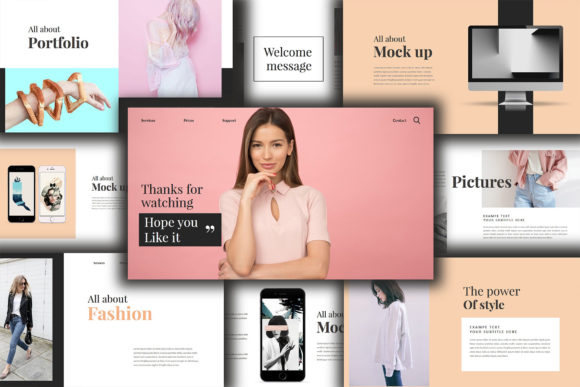
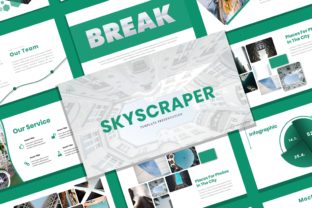
At its core, Skyscraper is a collection of 20 meticulously designed slides. It’s not about flashy animations or cluttered layouts. Its power lies in its clean, professional structure. The template uses a 16:9 widescreen ratio, which is now standard for everything from boardroom projectors to online video platforms. The layout is modern and elegant, with a creative edge that avoids looking sterile. It gives you a professional canvas that still feels unique, helping your content feel curated rather than just thrown together.
Where Skyscraper Truly Shines
This template’s versatility is one of its biggest strengths. While its name might evoke images of corporate skyscrapers, its application is far broader. For a photographer, it’s the perfect way to create a portfolio review or a client presentation, letting the images breathe within clean frames. A fashion designer could use it to present a new collection, with the elegant layout complementing the aesthetic of the work.
For business and corporate use, it’s a no-brainer. Quarterly reports, project proposals, and investor pitches all benefit from a template that communicates professionalism and forward-thinking design. But it’s equally at home for marketers outlining a campaign strategy, bloggers creating a media kit, or small business owners pitching to a new client. The template acts as a design asset that elevates your message, making it suitable for both internal meetings and external-facing pitches.
The Practical Design Features You’ll Actually Use
What makes a template useful isn’t just how it looks, but how it works. Skyscraper is built on Master Slides, which is the backbone of efficient PowerPoint design. This means you can make a global change—like updating a color scheme or logo placement—once, and it will apply across your entire presentation. It saves immense time and ensures visual consistency, a cornerstone of strong brand identity.
Every graphic element is fully resizable and editable. You’re not locked into a specific color palette or icon set. The template includes vector icons, which are infinitely scalable without losing quality, and uses recommended free web fonts, so you won’t run into licensing issues later. The picture placeholder feature is a practical lifesaver; you simply drag and drop your own images into pre-formatted shapes, guaranteeing a polished look without manual cropping and resizing every time.
Making It Your Own: Guidance for Best Results
Adopting any new template requires a bit of strategy. First, consider your project’s goal. Skyscraper’s personality is modern, clean, and professional. If your brand or message is more rustic, handcrafted, or whimsical, you might need to adapt the template more heavily. Evaluate if its style aligns with your visual hierarchy needs. Its structured grids are excellent for presenting data and concepts clearly.
Next, think about font pairing. The template suggests specific fonts, but you can experiment. A strong pairing might involve using the template’s recommended sans serif font for body text for maximum readability, and introducing a complementary display font or even a subtle script font for key headings to add a touch of personality. Always test your text at different sizes to ensure readability on a screen, especially for people viewing from the back of a room or on a smaller laptop display.
Finally, remember that the images in the demo are for preview only. The real magic happens when you drop in your own photography, charts, and content. Use the structure as a guide, but let your own material be the star. The template provides the professional framework; you provide the compelling story. By leveraging its thoughtful layout and editable features, you can create presentations that are not only visually striking but also fundamentally effective at communicating your ideas.