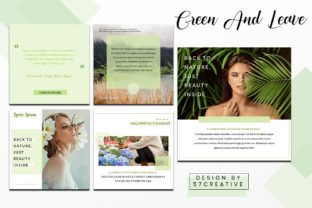
Green and Leave: Elevate Your Instagram Feed with This Template
There’s a moment when you open a new design project and the blank canvas feels more like a barrier than an opportunity. You know the content is strong, the product is great, but how do you package it for Instagram in a way that feels fresh, cohesive, and professional without spending hours tweaking pixels? This is where a thoughtfully crafted template becomes more than just a shortcut—it becomes a strategic asset. The Instagram Feed - Green and Leave Themes PowerPoint template is designed to solve that exact problem, offering a versatile, nature-inspired foundation for anyone looking to create a visually stunning and consistent social media presence.
A Visual Breath of Fresh Air
At its core, the Instagram Feed - Green and Leave Themes template is built around a palette of organic greens, earthy tones, and clean, modern layouts. Think of it as a digital terrarium for your content. The visual personality is calm yet confident, elegant but approachable. It uses a mix of serif and sans-serif typography, creating a balanced visual hierarchy that guides the viewer's eye naturally from headline to body text to call-to-action. The layouts incorporate leaf motifs and botanical elements not as overpowering graphics, but as subtle accents that frame your images and text. This careful restraint is what gives it a professional and modern typography feel, avoiding the trap of looking overly themed or seasonal. It’s a style that speaks of growth, sustainability, and curated beauty.
This isn't just a collection of pretty slides. It’s a design asset built for real-world application. The template is structured with master slides, meaning you can change a color, font, or graphic element once and see it update across all five layouts. This is crucial for maintaining brand consistency, especially if you're managing content for a client or your own business over time. The picture placeholder functionality is a game-changer. You simply drag and drop your own photography into the designated areas, and the template’s frames and compositions do the heavy lifting, ensuring your visuals look polished and intentional every single time.
Where This Template Truly Shines
The beauty of the Instagram Feed - Green and Leave Themes lies in its chameleon-like adaptability. While the botanical theme might initially suggest a perfect fit for a florist, plant shop, or wellness brand, its applications are far broader. The clean lines and sophisticated color scheme make it an excellent choice for a cafe or restaurant wanting to highlight fresh ingredients or a serene ambiance. For a coffee shop, the earthy greens can complement the rich browns of coffee beans, creating a feed that feels both cozy and curated.
But its utility extends beyond food and beverage. A fashion brand focused on sustainable clothing or earth-toned apparel would find the template’s aesthetic a natural extension of their brand identity. Similarly, a couple consulting service or a couple application could use the organic, growth-oriented theme to symbolize new beginnings and nurturing relationships. Even for adventure brands—think outdoor gear, hiking tours, or eco-travel—the green and leaf motifs can evoke a sense of exploration and connection with nature. The key is that the template provides a professional scaffold; you infuse it with your specific content and brand voice.
From a practical standpoint, it’s a lifesaver for entrepreneurs, marketers, and content creators who need to produce high-volume, high-quality content efficiently. Because it exports perfectly to JPG or PNG at the recommended Instagram post size of 1080x1080 pixels, you eliminate the guesswork of resolution and cropping. The drag-and-drop interface in PowerPoint means you don’t need to be a Photoshop expert to create graphics that look like they were made by one. This democratization of design is what allows small business owners and hobbyists to compete on a visual level with larger brands.
Making It Work for Your Project
Choosing a template like this is the first step; making it your own is where the real work—and fun—begins. Start by evaluating the five included slide layouts. Don’t just see them as individual posts, but as components of a larger Instagram feed narrative. Plan a content calendar that uses the different layouts strategically: a quote graphic on Monday, a product feature on Wednesday, a behind-the-scenes photo on Friday. This variety keeps your feed dynamic while the consistent theme maintains a cohesive look.
Pay close attention to font pairing. The template uses recommended free web fonts, which is a huge plus for accessibility and cost. However, you should test how your specific headlines and body copy read within those typefaces. Is the contrast between the serif and sans-serif clear enough for quick mobile scrolling? Does the font style align with your brand’s personality—whether it’s more playful, authoritative, or minimalist? The readability of your text over the leaf motifs and photo placeholders is paramount. Ensure there is sufficient contrast, and don’t be afraid to adjust the opacity of background elements if needed.
Finally, think beyond the single post. Consider how a series of these templates will look together in your grid. The Green and Leave Themes template is designed to create a harmonious flow, but previewing nine posts at a time will help you spot any unintentional repetitions in color or layout. This holistic view is what transforms a random collection of posts into a recognizable brand identity. Whether you’re a designer pitching a social media package to a client or a small business owner taking control of your own marketing, this template provides the creative font choices, structured layouts, and professional polish needed to make a lasting impression. It’s not just about filling a feed; it’s about building a visual world that your audience wants to step into, one leaf-framed post at a time.