Creative Presentation - Dilly: Your Go-To for Dynamic Slides
More Than Just a Template
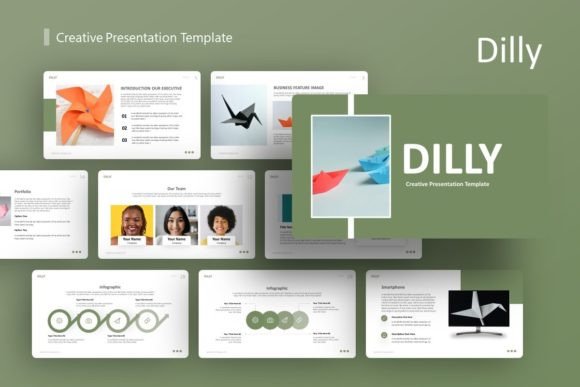
Every designer, entrepreneur, or creative professional has felt that familiar pressure: you have a brilliant idea, a crucial pitch, or a portfolio piece to share, but the presentation tools at your disposal feel stale, generic, or overly complicated. You need a foundation that is both visually compelling and functionally intuitive. This is precisely the gap that the Creative Presentation - Dilly template aims to fill. It’s not merely a collection of 36 slides; it's a thoughtfully constructed framework designed to translate complex ideas into clear, engaging visual narratives. The style strikes a balance between modern minimalism and creative energy, using clean layouts punctuated by handcrafted infographics and pixel-perfect illustrations. This gives it a personality that is professional yet approachable—serious enough for a corporate boardroom but dynamic enough for a startup pitch or a personal portfolio showcase.
The true value of a template like Creative Presentation - Dilly lies in its adaptability. It’s built on master slides, which means you’re not just getting pre-designed pages—you’re getting a system. This structure ensures consistency across your entire deck, a cornerstone of professional brand identity. The resizable and editable graphics, coupled with drag-and-drop picture placeholders, empower you to make it your own without wrestling with rigid design constraints. Whether you’re a marketer outlining a campaign, a photographer displaying your work, or a small business owner pitching investors, the template provides a coherent visual language that you can customize to speak directly to your audience.
Where This Template Shines: Practical Applications
Understanding where a tool works best is key to using it effectively. The Creative Presentation - Dilly template excels in scenarios where clarity, visual appeal, and professionalism must converge. For creative agencies and company profiles, it offers a polished stage to present case studies, team bios, and service overviews. The pre-built infographic slides are particularly useful here, transforming dry statistics or processes into digestible, memorable visuals. In the realm of pitch decks for startups, its clean aesthetic helps keep the focus on your core message and data, avoiding the distraction of overly ornate design. The included vector icons serve as versatile design assets to reinforce concepts without clutter.
Beyond the boardroom, its utility extends into more personal and specialized projects. A photography portfolio benefits from the template’s emphasis on imagery and negative space, allowing your photos to take center stage. For editorial design or blogging, it can be adapted to create compelling media kits or content strategy presentations. Even for personal projects—like planning a wedding, outlining a novel, or organizing a community event—the template provides a structured yet flexible canvas. The key is to evaluate the project’s tone. The modern, slightly playful yet professional style of Dilly aligns perfectly with contemporary brands, tech startups, and creative services, but might require more customization to suit ultra-traditional or highly formal corporate environments.
Making It Work: Tips for Effective Use
Simply having a great template is only half the battle; using it effectively is what creates impact. Start by reviewing all 36 slides to understand the range of layouts available. Don’t feel compelled to use every one—select the slides that best support your story’s flow. The master slide structure is your best friend here. Before you dive into content, customize the master slides with your core brand colors and primary font pairing. This single step will save you hours and guarantee a unified look. Since the graphics are editable, consider how they can be tailored to reflect your specific industry. An infographic for a tech startup might highlight user growth, while one for a creative agency could map out a design process.
Readability is paramount. While the template is visually engaging, ensure your text has sufficient contrast against its background and that you’re not overloading slides with information. Use the placeholder system for images—it’s designed for a reason, helping maintain alignment and proportion. Test your font pairing choices within the actual template; a serif font for headings might pair well with a clean sans serif font for body text, but always preview it on the slide backgrounds to check legibility. Finally, remember the note about images: the demo visuals are for inspiration. Source your own high-quality, relevant imagery to truly make the presentation yours. By treating Creative Presentation - Dilly as a flexible starting point rather than a finished product, you can leverage its strong modern typography and design foundations to build presentations that are not only beautiful but also effective tools for communication and persuasion.