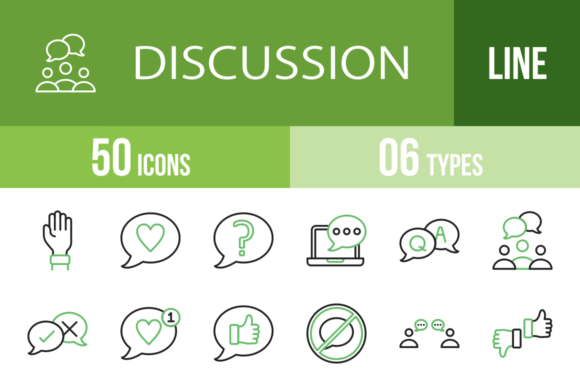
50 Discussion Green & Black Icons: The Ultimate Design Asset
In the fast-paced world of digital communication, visual cues are everything. Whether you're designing a mobile app interface, building a website, or creating a presentation, the right icons can make or break user experience. That's where the 50 Discussion Green & Black Icons set comes in—a versatile, professionally crafted collection designed to streamline conversations, feedback, and interactions across any platform.
Designed for Maximum Usability Across All Platforms
This isn't just another generic icon pack. Each of the 50 discussion icons has been meticulously designed using a unigrid system, ensuring perfect alignment, consistent stroke weights, and balanced negative space. The green and black color palette offers a modern, approachable aesthetic that works seamlessly in both light and dark interfaces. The icons are 100% vector-based, meaning they scale flawlessly from tiny mobile screens to large print formats without losing clarity or sharpness.
The collection covers a comprehensive range of discussion-related concepts, from basic communication symbols like Chat Bubble, Phone Call, and Mail to more nuanced interaction indicators such as Agree Disagree, Feedback, and Mediator. You'll find icons for specific platforms too—Video Conference, Online Meeting, Web Chat, and Global Conference—making this set particularly valuable for SaaS companies, remote work tools, and community platforms.
Practical Applications for Designers and Creators
For web designers and UI/UX professionals, these icons are ready to deploy immediately. The set includes six different formats—AI, CDR, EPS, JPG, PNG, and SVG—along with 20 PNG sizes, so you're never stuck converting or resizing assets. Drop the SVGs into your Figma or Sketch project, use the PNGs for quick prototyping, or edit the vector files in Illustrator to customize colors and details.
When it comes to brand identity and logo design, a consistent icon system reinforces professionalism. Imagine a customer support platform using Q & A, Chat Question, and Feedback icons throughout their interface—the visual language becomes instantly recognizable. The green and black palette suggests trust, growth, and clarity, which aligns perfectly with brands in tech, education, healthcare, and sustainability sectors.
Marketers and content creators will appreciate how these icons enhance social media graphics and editorial design. Use Like Chat, Person Like, and Yes Banner to create engaging call-to-action visuals. The Raise Hand icon works beautifully for webinar promotions, while Video Call and Laptop Video are perfect for promoting virtual events or online courses.
Enhancing Communication and User Experience
Icons do more than decorate—they guide behavior. A well-placed Discussion icon next to a comment section signals that conversation is welcome. The Yes No and Agree Disagree icons can simplify complex feedback mechanisms in surveys or voting interfaces. For mobile app developers, the Smartphone, Mobile Chat, and Tablet Chat icons ensure touch-friendly, instantly recognizable navigation elements.
The unigrid system behind this collection isn't just about aesthetics—it's about functional consistency. When every icon shares the same structural framework, your interface feels cohesive and intuitive. Users don't have to relearn what each symbol means; the visual grammar is predictable and professional. This consistency directly impacts readability, visual hierarchy, and overall user engagement.
Choosing and Implementing the Right Icons
Before integrating any icon set into your project, evaluate the specific needs of your audience. If you're building a customer support dashboard, prioritize icons like User Chat, Computer Chat, Phone Call, and Calling. For educational platforms, Children Discussion, Team Discussion, and Laptop Chat might be more relevant.
Testing is crucial. Place the icons alongside your existing typography and color scheme. Do they feel harmonious or jarring? The green and black palette is versatile, but if your brand uses a different primary color, you can easily edit the vector files to match. The SVG format is particularly useful here—adjust colors in code or design software without opening Illustrator.
Consider font pairing as well. Icons should complement your chosen typeface, not compete with it. A clean sans serif font pairs naturally with these modern icons, while a serif font might create an interesting contrast for editorial projects. Avoid overly decorative script fonts or handwritten fonts that could clash with the icons' structured geometry.
Licensing and Commercial Use
One of the most practical aspects of this collection is its commercial font and asset licensing. Whether you're a freelance designer working on client projects, a small business owner building your own website, or a publisher creating print materials, the licensing terms are straightforward. You can use these icons in personal and commercial projects without worrying about attribution or additional fees—just review the specific license agreement to ensure compliance with your use case.
The 20 PNG sizes included mean you're covered for virtually any resolution requirement. From tiny favicon-sized icons to large banner graphics, you won't need to manually resize or re-export. This saves hours of production time, especially when working on multi-platform projects that require assets for web, mobile, print, and presentation formats simultaneously.
Ultimately, the 50 Discussion Green & Black Icons set is more than a collection of graphics—it's a design asset that solves real communication challenges. Whether you're enhancing a mobile app, refining a website, or creating packaging design for a tech product, these icons provide the visual vocabulary needed to facilitate clear, engaging conversations between your brand and its audience.